Symbol Resolution
Prev: Symbols and Symbol Tables
TOC: Linking
Next: Relocation
- A symbol is resolved by the linker by associating each reference with exactly one symbol from the symbol table of it's input relocatable object files.
- For local symbol references it's straight forward, compiler already does half the work by making sure only one local symbol remains per module but same can't be said about global symbols
- When compile a module, if a compiler sees a symbol not defined withing a module it assumes it's defied in some other module and generate a Symbol or the module's Symbol Table.
- If multiple modules define global symbol with same name, the linker must either flag an error or somehow choose one definition over another.
NOTE: C++ and Java allow function overloading through a process called name mangling and the reverse is demangling
How Linker Resolve Duplicate Symbol Names:
- During compile time the compiler exports each global symbol to the assembler as either strong and weak and the assembler encodes that info implicitly to the Relocatable Object Files.
- Functions and initialized global variables get strong symbol category and unitialized global vars get weak symbol category getting put COMMON entry in short section
- Given this notion of string and weak symbols, linkers follow these rules when dealing with duplicate symbol names:
- Rule 1: Multiple strong symbols with same name's NOT ALLOWED.
- Rule 2: Given a strong symbol and multiple weak symbol with the same name, choose the strong one.
- Rule 3: Given multiple weak symbols with the same name, choose any.
-Example of a nasty bug for someone who might be unwary of this:
/*foo5.c*/
int x = 12345;
int main(){
	f();
	printf("x = 0x%x \n", x);
	return 0;
}
/*bar5.c*/
double x;
void f(){
	x = -0.0;
}
linux> $ gcc -o prog foo5.c bar5.c
- When we compile the program as follows it will compiler perfectly, but when running since bar5.c has weak symbol for x, the x = -0.0 will be assigned for x in foo5.c.
- And corresponding hexa for -0.0 is very different from normal int 0, so the final print might be unexpected.
Linking with Static Libraries:
- All compilation systems provide a mechanism for packaging related object modules into a single file called static library, here linker is not involved and no executable is formed.
- And when it's time to do linking to form some application the linker only copies the object module in the library that are referenced by the application program
- libc.a is a library with a lot of standard I/O function, string manipulation etc.. libc.a is always passed by the C compiler driver.
- In linux system static libraries are stored on disk in a file format called archive, it's a collection of concatenated relocatable object file, it's header describing size and location of each member object file. It has .a suffix
-Example: bundling two relocatable object files into one static library:
/*addvec.c*/

int addcnt = 0;

void addvec(int *x, int *y, int *z, int n){
	 int i;
	 addcnt++;
	 for(i = 0; i < n; i++)
		 z[i] = x[i] + y[i];
}
/*multvec.c*/

int multcnt = 0;

int multvec(int *x, int *y, int *z, int n){
	int i;
	multcnt++;
	for(i = 0; i < n; i++)
		z[i] = x[i] * y[i];
}
- Now to bundle these into a static library we first compile them to relocatable object files:
linux> gcc -c addvec.c multvec.c
- And use
ARtool as following:
linux> ar rcs libvector.a addvec.o multvec.o
ar rcsexplanation:aris just invoking the archive utility of linux.rcsmeans:r- replace: if libvector.a already exist it will replace any older version of addvec.o or multvec.o with the new ones.c- create: tellarto create a new library file if one doesn't already exist. On usingrwithoutcit would still work but will give a warning.s- write index: Basically parsing all the object modules and creating a global symbol table mapping symbol names to specific .o files inside the archive. This will make the linker later have an easier time finding what it needs.
- The object module in about static library in both case touches a global variable to keep count of number of operations done, it will be useful for Position Independent Code explanation.
- Now if we want to use this then:
/*main2.c*/
#include <stdio.h>
#include "vector.h"

int x[2] = {1, 2};
int y[2] = {3, 4};

int main(){
	addvec(x, y, z, 2);
	printf("z = [%d %d]\n", z[0], z[1]);
	return 0;
}
-And we can just invoke the library as needed:
linux> gcc -c main2.c
linux> gcc -static -o prog2c main2.o ./libvector.a
-or equivalenty,
linux> gcc -c main2.c
linux> gcc -static -o prog2c main2.o -L -lvector
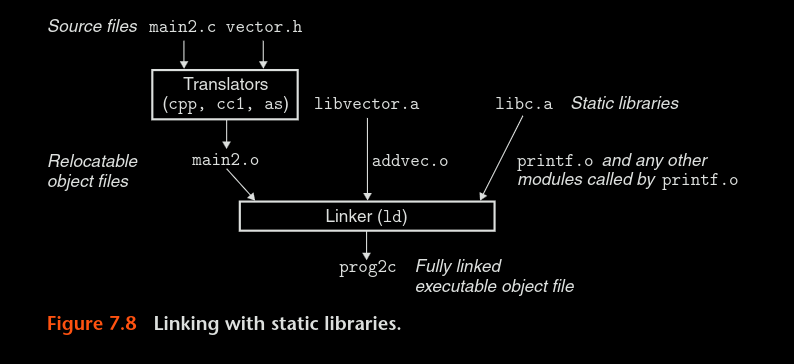
Fig: Linking with static library
- NOTE: only the module used in the main file will be included in the executable by the linker
How Linkers Use Static Libraries to Resolve References
- Linker goes over the object file in the order you give it to the compiler driver, eg:
linux> gcc -static -o prog me.o you.o -L -lvec
- The linker first goes through me.o, then you.o and finally through all the object modules in libvec.a
- When going through, the linker maintains 3 sets:
- set E of relocatable files that will be merged to form an executable
- set U of undefined references in those relocatable files
- set D of symbols defined in each of those files in E
- Step by step example for above static linking:
- So in above example, linker first goes through me.o, since it's a relocatable files, it will go to set E, any undefined reference here is put in set U and any symbols defined here is put in D
- you.o goes through the same process
- then the linker goes through libvec.a archive and parses each object file, if it defines something that's undefined in U, then it's included in E and everything that's defined in it is put onto D, else it's discarded.
- At the end if there's any symbol left in set U (i.e still undefined) then the linker throws some error our way.
- Thus, very important to keep in mind the order of file you use to invoke the compiler driver.
Prev: Symbols and Symbol Tables
TOC: Linking
Next: Relocation