Loading Executable Object Files
Prev: Executable Object Files
TOC: Linking
Next: Dynamic Linking with Shared Libraries
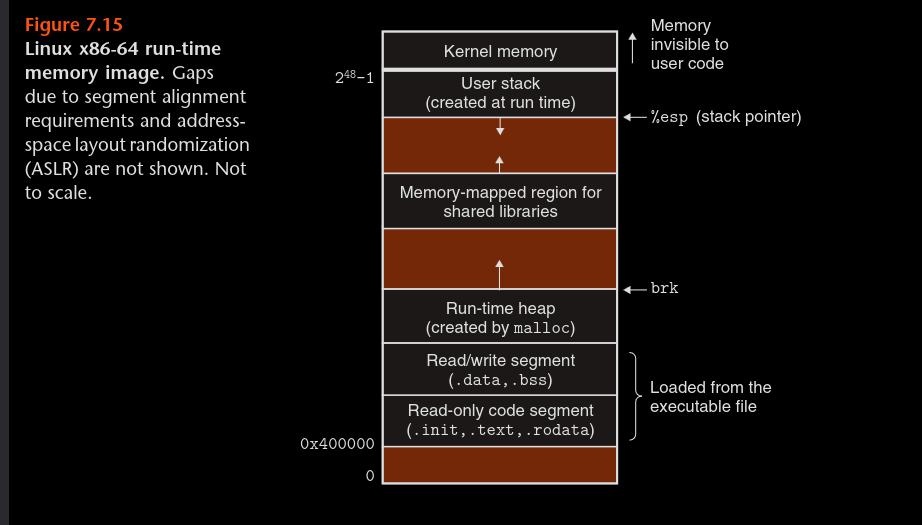
- We can load execute/ run an executable object file as follows:
linux> ./prog
- Every linux program has a run-time memory address as shown above.
- Cuz prog does not correspond to any built in shell command, the shell assumes it's some executable so it calls some memory resident operating system code called loader, any linux program can invoke loader by calling excev function.
- The code segment starts at 0x400000 due to some historical reasons and also to define space for null pointers.
- First is read only segment, also has elf headers and segment header table even tho it's not shown in the diagram above.
- Right above is the read/write segment where the actual data is stored, followed by the heap, then mapped region for shared libraries and finally the stack above which lives kernel which is the memory resident part of the OS.
- Even tho the code segment and data segment are shown as being attached in actuality due to alignment requirements they are not and some padding could occur as OS maps out the executable file into virtual memory.
- The loader after we run the executable, guided by the segment header table of the executable creates a run time memory image like above and jumps into the _start fnc defined in system object file ctr1.o
- the start function then calls the system startup func, _libc_start main which is defined in libc.so and it initializes the execution environment, calls user lvl main function and handles return values.
Prev: Executable Object Files
TOC: Linking
Next: Dynamic Linking with Shared Libraries